
Thermostat How-To
How to Use Away Mode on Your Amana Smart Thermostat
Away mode holds energy-saving temperatures while nobody is home. It takes a minute to set up on the thermostat or in the SkyportHome app.
At a Glance
3 minutes
Time
Set it once, then turn it on and off when you leave and return.
Easy
Difficulty
A few taps on the thermostat or in the app.
Two temperatures
What you set
One for heating and one for cooling.
Automatic option
Geofencing
The app can switch Away on for you.
Step-by-Step: Away Mode
The steps are the same on the thermostat and in the SkyportHome app.
Step 1
Open the Away screen
On the home screen, tap the Away icon.

Step 2
Turn Away on
Switch the Away setting from Off to On.
Step 3
Go to the temperature screen
Tap Exit to leave the settings and see the Away temperatures.
Step 4
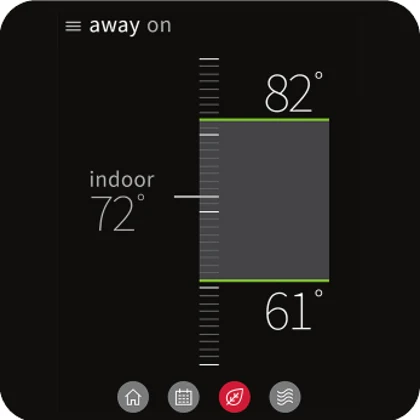
Set the heating temperature
Touch the heating line and slide it up or down to the temperature you want while you are away.
Step 5
Set the cooling temperature
Do the same with the cooling line. Both Away temperatures are now saved.
Step 6
Return to the home screen
Tap the Home icon. A notice on the home screen shows that Away is on.
Step 7
Turn Away off when you are back
Tap the Away icon, open the menu, switch Away from On to Off and tap Exit. Tap Home to leave.
Choosing Away Temperatures
- A moderate setback usually saves energy. Very deep setbacks can leave the system working hard to recover.
- On a heat pump in winter, a big setback can bring on expensive backup heat when you return.
- In summer, leave the cooling setpoint high enough to save energy but low enough to keep the house from getting too hot or humid.
- Consider geofencing so Away turns on by itself when everyone leaves.
When to Call Us Instead
Away mode is a simple setting. Call if you see these.
- The house does not return to normal temperature after you turn Away off.
- The thermostat and app show different Away settings after you changed them.
- The system runs constantly or short cycles when Away ends.
Away Mode Questions
What does Away mode do on the Amana smart thermostat?
It switches the thermostat to a set of energy-saving heating and cooling temperatures that you choose, until you turn Away off.
Can the thermostat turn Away on by itself?
Yes. With geofencing set up in the SkyportHome app, the thermostat can switch to Away when everyone has left.
Should I use a big setback on a heat pump?
A moderate setback is safer. Large swings can make a heat pump call for electric backup heat to catch up, which costs more to run.
Do I set Away on the thermostat or in the app?
Either. The steps are the same in both places.
Questions About Saving Energy?
We can review your thermostat settings and show you the schedule that suits your house.
See our smart thermostat installation, the Amana lineup and the Amana smart thermostat help center.
These steps are written for the Amana brand smart thermostat (model ATST-CWE-BL-A) and the SkyportHome app. Screens can vary a little with software versions. Amana is a registered trademark of Maytag Corporation or its related companies and is used under license. Rest Assured HVAC LLC installs and services Amana equipment. Amazon, Alexa, Google and Google Home are trademarks of their respective owners.