
Thermostat How-To
How to Use the Honeywell Home FocusPRO N100 Thermostat
The FocusPRO N100 is a simple, non-programmable thermostat: no schedules, no app, just a big display and a few buttons for heat, cool and fan. This guide covers everyday operation. If it isn’t mounted and wired yet, that’s a job for a licensed technician.
At a Glance
Non-programmable
Type
No app, no schedules — just set the temperature and system mode by hand.
3H/2C & 2H/2C
Compatible systems
Up to 3-heat/2-cool heat pump systems, or 2-heat/2-cool conventional systems.
Large, clear font
Display
Easy-to-read screen, with an optional always-on backlight when hardwired.
5 years
Warranty
Honeywell Home’s published limited warranty for this model.
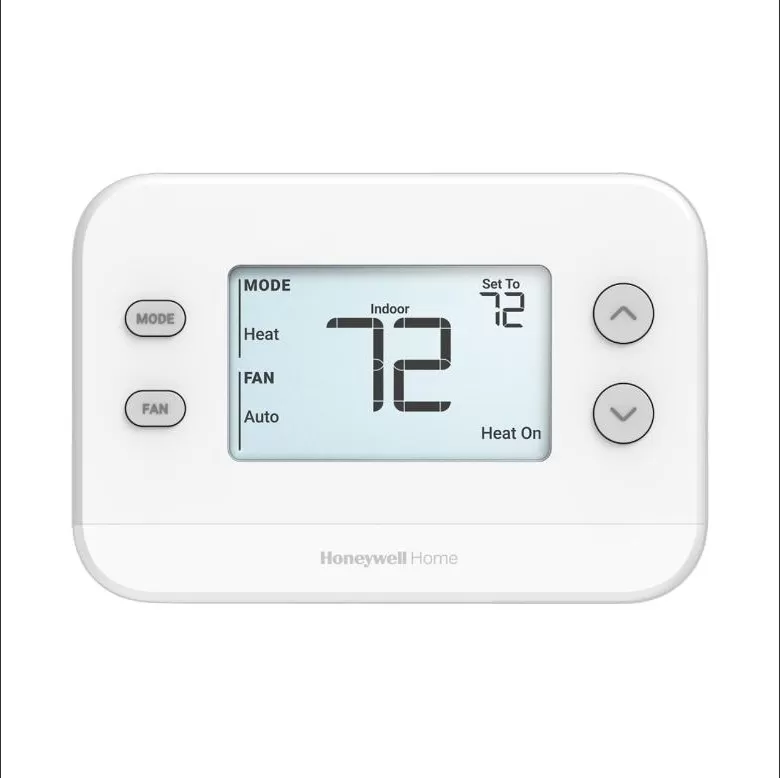
Step-by-Step: Basic Operation
There’s no app or Wi-Fi to set up here — this is everything you do right on the thermostat.
Step 1
Choose your system mode
Press MODE to cycle through Auto, Heat, Cool, Emergency Heat (heat pump systems only) and Off, stopping on the one you want.
Step 2
Choose your fan mode
Press FAN to cycle through Auto (fan runs only with heating or cooling), On (fan runs constantly) and, on some setups, Circ (fan runs part-time to circulate air).
Step 3
Set the temperature
Use the up and down arrows to raise or lower the setpoint. The system runs toward that temperature until you change it again; since it’s not programmable, there’s no schedule to interrupt.
Daily-Use Features
Manual, on-demand control
Since there’s no schedule, every change you make sticks until you change it again. That makes it a straightforward choice for anyone who’d rather not deal with programming.
Display backlight
When hardwired, an optional always-on backlight is available for easier nighttime reading.
Filter reminder
This model includes a filter change reminder so you don’t have to rely only on a mental calendar. See our air filter guide for how often to actually change it.
Heat low limit
A low-temperature limit defaults to 40°F to help prevent frozen pipes, and can be set down to 32°F for an unheated space like a garage. This setting is typically configured by your installer.
Tips for Best Use
- Use Emergency Heat sparingly on a heat pump system; it runs backup electric heat, which costs more to run than normal heat pump operation.
- Leave the fan on Auto for most homes; running it On constantly uses more energy without much comfort benefit for most households.
- Small, steady temperature changes are easier on your system than big swings back and forth.
- Don’t ignore the filter reminder; a dirty filter is one of the most common reasons a system seems to be struggling to keep up.
Common Mistakes to Avoid
- Running the air conditioner when it’s below 50°F outside, which risks compressor damage.
- Expecting a schedule or app — this model is non-programmable and has neither.
- Assuming a locked display means it’s broken; it’s usually just the keypad lock, which the homeowner can clear.
- Letting batteries run down without replacing them, which can eventually cause a blank display even with normal house power.
Troubleshooting
- Blank display. If it’s battery-powered, check the batteries first; if it’s hardwired, check the breaker for your HVAC system. A persistently blank screen after that points to a wiring issue, not a setting.
- Temperature isn’t changing. Confirm you’re in the right system mode (not Off) and that the fan mode didn’t get left on a setting that’s masking whether heating or cooling is actually running.
- Fan won’t turn on or off. Press FAN to confirm which mode it’s in; Auto only runs the fan with a heating or cooling call, which can look like “not responding” if you’re expecting it to run all the time.
- System runs but doesn’t reach the setpoint. Check the air filter first; a clogged one is often the simplest explanation and is covered in our air filter guide.
If the buttons and breaker don’t fix it, call (847) 224-2420 and we’ll take a look.
FocusPRO N100 Questions
Can I set a schedule on this thermostat?
No, the N100 is non-programmable by design. If you want scheduling, look at a programmable or smart thermostat instead, like our Prostat+ PSP2270 guide.
What does Emergency Heat mode do?
It’s only available on heat pump systems and runs backup electric heat along with the fan. It’s meant for when the heat pump itself needs help keeping up, not everyday use.
Does it connect to an app or Wi-Fi?
No, this model has no app or Wi-Fi connectivity. Everything is controlled with the buttons on the thermostat itself.
What if it isn’t mounted yet?
This guide only covers day-to-day button operation. Mounting and wiring it involves your HVAC system’s low-voltage wiring, which we recommend leaving to a licensed technician.
Ready for an Upgrade or Need It Installed?
We install the FocusPRO N100 and plenty of smart alternatives if you’d rather have scheduling and remote control.
See our smart thermostat installation service or the How-To Hub.
This guide is general homeowner information and is not a substitute for Resideo’s own manual or support resources. Honeywell Home and FocusPRO are trademarks of Resideo Technologies, Inc. or its affiliates.
