Dehumidifier How-To
How to Set and Use the AprilAire 76 Dehumidifier Control
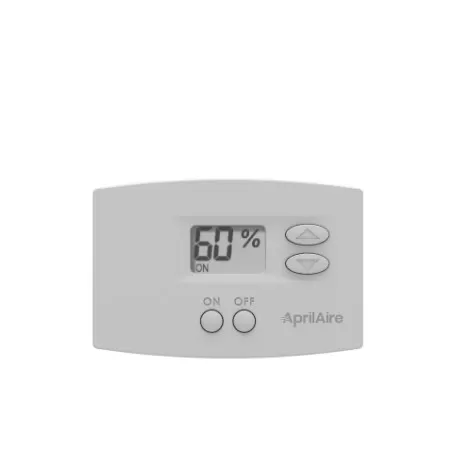
The AprilAire 76 is a digital wall-mount control for AprilAire E-Series whole-house dehumidifiers. It shows the current humidity reading and lets you set a target level with a couple of buttons. This guide covers day-to-day use. If it isn’t mounted and wired to your dehumidifier yet, that’s a job for a licensed technician.
At a Glance
On/Off + Up/Down
Control type
A simple digital wall control: On/Off button, up and down arrows, and an LCD display.
59% RH or Level 3
Starting point
External (whole-home) control starts around 59% RH; remote control for a crawlspace or sealed attic unit starts at dryness level 3.
E070KZ–E130KZ
Works with
AprilAire E070KZ, E080KZ, E100KZ and E130KZ whole-house dehumidifiers.
Crawlspace Ready
Remote mode
Can be wired as a remote control for a crawlspace or sealed-attic dehumidifier, separate from the main living space.
Setting Your Humidity Level
This covers using the control day to day. Mounting it and running wire to your dehumidifier is an installer-level job, not covered here.
Step 1
Turn it on
Press the ON button. “ON” appears on the display along with the current humidity reading.
Step 2
Set your target
Use the up and down arrows to raise or lower the setting. Each press changes it by 1% (or 1 dryness level in remote mode).
Step 3
Give it 24 hours
New installs often run long at first because your home’s building materials release stored moisture back into the air. Wait a full day before judging the result.
Step 4
Fine-tune from there
If the air still feels damp or clammy, lower the setting one step at a time and give it another day to catch up.
Daily-Use Features
Reading the display
A solid “ON” means the control is powered on. A blinking “ON” means the dehumidifier is actively running. The display keeps showing the measured humidity even when the control is off.
Away or vacation setting
For an extended summer absence, set external control to around 59% RH and raise the thermostat as high as is still safe for pets, plants and your home’s contents.
Open windows
Turn the control off if you’ll have windows open for an extended period — outdoor humidity will overwhelm the dehumidifier otherwise.
Crawlspace / remote mode
If this control runs a crawlspace or attic unit, set the dryness level only as low as that space actually needs.
The blinking asterisk
A blinking “ON” with an asterisk (*) means outdoor conditions are outside the control’s operating limits. This is normal, not a fault — it resumes automatically once conditions come back in range.
Cleaning
Spray glass cleaner or a mild household cleaner onto a soft cloth, never directly onto the control, then wipe gently.
Common Mistakes to Avoid
- Expecting instant results and lowering the setting again and again right after installation — give it a full 24 hours first.
- Spraying cleaner directly onto the control instead of onto a cloth.
- Leaving a crawlspace or attic unit’s remote control set lower than that space needs, which just runs the dehumidifier harder than necessary.
- Forgetting to turn off external control when windows will be open for more than a day or two.
Troubleshooting
- Display shows a blinking “ON” with an asterisk. Outdoor conditions are outside the control’s limits (roughly: dew point below 40°F or temperature above 99°F for external control; temperature below 50°F or above 105°F for remote control). It resumes on its own once conditions return to range.
- Dehumidifier runs constantly after a new install. Normal for the first 24 hours while your home’s materials release stored moisture. Give it a full day before adjusting anything.
- Display is blank or unresponsive. Check that the dehumidifier has power at its breaker. If the display stays blank, give us a call.
- Setting won’t change. The control has to be ON before the up/down arrows will adjust the setpoint — press ON first.
AprilAire 76 Questions
Do I need to do anything with this control day to day?
Not really — once it’s set, leave it running. Adjust it manually only if a room feels too damp or too dry.
What’s the difference between external and remote control mode?
External control manages humidity in your living space from this control’s own sensor. Remote control runs a second dehumidifier, typically in a crawlspace or sealed attic, from a dryness-level setting instead of a direct RH target.
Can I call AprilAire directly about the dehumidifier itself?
Yes — AprilAire’s customer support line is 800-334-6011 for questions about the equipment itself.
What if it isn’t mounted yet?
This guide only covers day-to-day use once it’s installed. Mounting it and wiring it to your dehumidifier means working with low-voltage control wiring, which we recommend leaving to a licensed technician.
Want It Installed and Set Up for You?
We’ll mount the control, wire it to your dehumidifier, and get it set to the right level for your home in one visit.
See our indoor air quality services or the How-To Hub.
This guide is general homeowner information and is not a substitute for AprilAire’s own manual or support resources. AprilAire is a registered trademark of Research Products Corporation.
