
Humidifier How-To
How to Use the AprilAire 4655 Manual Humidistat
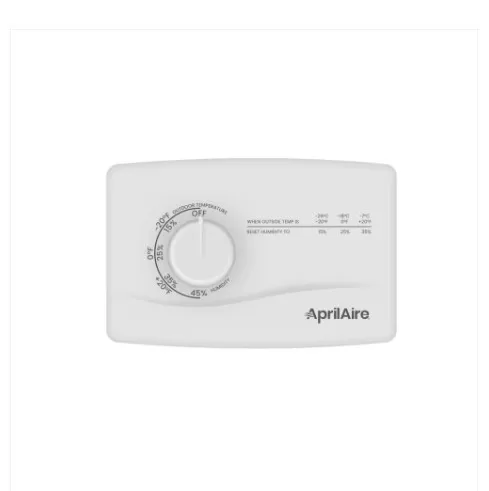
The AprilAire 4655 is a mechanical, 2-wire humidistat for AprilAire 400, 500, 600 and 700-series humidifiers — a dial control with no digital display and no app. This guide covers setting and testing it day to day. If it isn’t mounted and wired yet, that’s a job for a licensed technician.
At a Glance
Mechanical Dial
Control type
No digital display or app — a dial you turn by hand, with a Test/Reset position.
Test/Reset Position
Built-in test
Turning the dial to Test/Reset runs the humidifier for about a minute to confirm it’s working.
400–700 Series
Works with
AprilAire 400/400M, 500/500M, 600/600M and 700/700M bypass and powered humidifiers (check your model plate to confirm).
5-Year Warranty
Manufacturer warranty
Covered by AprilAire’s 5-year warranty from the date of purchase.
Setting Your Humidity Level
This covers using the dial once it’s installed. Mounting it and running wire to your humidifier is an installer-level job, not covered here.
Step 1
Match the dial to the outdoor temperature
The dial face is printed with outdoor-temperature positions, each lined up with the humidity level it sets. Turn the pointer to roughly match the current outdoor temperature and leave it there for a day.
Step 2
Check for condensation
Look at your windows and interior surfaces. If you see moisture or dampness, turn the dial toward the next colder temperature position.
Step 3
Check for dryness
If the home still feels dry or you notice static shocks, turn the dial toward the next warmer temperature position, waiting about a day between adjustments.
Step 4
Test it
Turn the dial to Test/Reset to run a roughly 60-second test cycle. On humidifiers with a water-panel reminder light, this also clears that light.
Daily-Use Features
Seasonal adjustment
This dial is marked directly by outdoor temperature — as it gets colder outside, move the pointer to the colder position so the matching (lower) humidity level is set. Colder air holds less moisture before windows start to sweat.
Water-panel reminder
If your humidifier has a water-panel change indicator, turning this dial to Test/Reset is also how you clear that light after replacing the panel.
Blower activation switch
Some installations include a separate switch that runs the furnace fan along with the humidifier. Leave it in the position your installer set unless you want the fan running more often.
No app, no Wi-Fi
This is a simple mechanical switch, not a smart device. There’s nothing to pair or update — just the dial and the Test/Reset position.
Common Mistakes to Avoid
- Expecting a digital display or app pairing — the 4655 is a mechanical dial control only.
- Leaving the dial on an old outdoor-temperature position once it gets noticeably colder outside, which leads to condensation on windows.
- Turning the dial up too far, too fast, instead of waiting a day between adjustments.
- Mistaking the Test/Reset position for a regular operating setting and leaving the dial there.
Troubleshooting
- Condensation on windows. Turn the dial down one notch and give it a day to catch up.
- Home feels dry or you notice static shocks. Turn the dial up one notch at a time, waiting about a day between adjustments.
- Humidifier doesn’t run at the Test/Reset position. Confirm your thermostat is calling for heat and the furnace fan is running — most AprilAire humidifiers only run alongside the blower. Call us if it still won’t run.
- Water-panel light won’t clear. Make sure the dial is turned fully to the Test/Reset position, not just near it.
AprilAire 4655 Questions
Does the 4655 have a digital display?
No. It’s a mechanical dial control with no display and no app — the dial position is the setting.
What’s a reasonable setting to start with?
Match the dial pointer to today’s outdoor temperature using the markings printed on the dial, then adjust from there based on window condensation or dryness. Your owner’s manual has the full reference table for your model.
Can I use this with any AprilAire humidifier?
It’s built for the 400, 500, 600 and 700-series humidifiers. Check your humidifier’s model plate, or call us, to confirm compatibility before swapping one in.
Can I call AprilAire directly about the humidifier itself?
Yes — AprilAire’s customer support line is 800-334-6011.
Want It Installed and Set Up for You?
We’ll mount the humidistat, wire it to your humidifier, and set it to a sensible starting point for your home in one visit.
See our indoor air quality services or the How-To Hub.
This guide is general homeowner information and is not a substitute for AprilAire’s own manual or support resources. AprilAire is a registered trademark of Research Products Corporation.
